

PBAX316-90108MV1 USB Desktop High-Definition Audio Decoder Evaluation Board User Guide
Phaten Cloud Login/Register


First-Time Setup
After receiving the evaluation board, users can follow the steps below to install and configure the environment for evaluation.
Driver Installation
The evaluation board supports USB UAC 2.0 audio playback. Windows 10 build 1809 and later versions have native USB UAC 2.0 driver support. However, the native driver can only play audio at sampling rates up to 384 kHz. To evaluate 768 kHz sampling rates and DSD formats, a third-party driver must be installed.
Windows System:
-
Download the evaluation driver Thesycon-USB-Audio-Class-2_0-Evaluation-Driver-for-Windows_5_58_0.zip. After extraction, run XMOS_TUSBAudio_eval_v5.58.0_2023-06-29_setup.exe directly and proceed with the default installation.
-
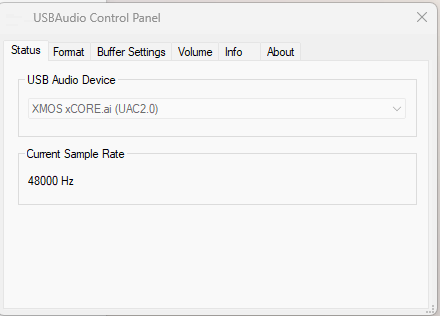
Connect the evaluation board to the Windows PC via USB cable. Click the TUSB icon in the lower right corner. If the USB Audio Device displays as shown in the right figure, the driver is running properly.
-
The evaluation board will enumerate as USB 2.0 Audio Devices (UAC2.0) in Device Manager.
-
In the Playback tab, set USB 2.0 Audio Devices (UAC2.0) as the default device.
Linux System:
No driver installation required
Mac System:
No driver installation required
Mobile Phone:
No driver installation required
Audio Evaluation
The evaluation board has 3 indicator LEDs: USB, OPT, and COX, representing USB, optical, and coaxial modes respectively.
- Short press the MODE button, USB indicator lights up, play USB audio.
- Short press the MODE button, OPT indicator lights up, play OPT audio.
- Short press the MODE button, COX indicator lights up, play COX audio.