A316-HF-DAC-V1 USB HiFi Audio Decoder Evaluation Board User Manual


×
Phaten Cloud Login/Register
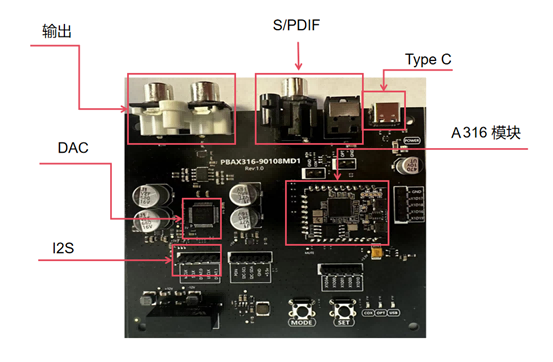
1. Evaluation Board Hardware Specifications
- The A316-HF-DAC-V1 is an evaluation board specifically designed for USB desktop hi-fi audio decoders, featuring the Phaten Audio A316_1926V1 XU316 module. The evaluation board supports USB, optical, coaxial, and I2S audio source inputs. Different audio input sources can be selected via buttons.
- The evaluation board employs an AKM4493SEQ DAC for analog audio output.
- Supported Audio Interfaces
- USB 2.0 (Full-speed and High-speed)
- I2S/TDM
- S/PDIF (Optical/Coaxial)
- Direct Stream Digital (DSD)
- Supported Audio Sampling Rates
- PCM: 44.1kHz, 48kHz, 88.2kHz, 96kHz, 176.4kHz, 192kHz, 352.8kHz, 384kHz, 705.6kHz, 768KHz
- DSD: DSD 64, DSD 128, DSD 256, DSD 512
- DOP: DOP 64, DOP 128, DOP256
- System Compatibility
- UAC 2.0 protocol, supports ASIO, compatible with multiple operating systems including Windows, Linux, Android, Mac OS, and iOS
| Interface | Function |
|---|---|
| Type-C | Connect to PC/smartphone USB for USB audio input and 5V power supply |
| S/PDIF | Optical/coaxial digital audio input |
| I2S | I2S input |
| Output | RCA left and right channel analog audio output |
USB Audio Input with AKM4493 DAC
| Parameter | Value |
|---|---|
| THD+N RATIO | 108.232dB |
| SIGNAL-NOISE RATIO | 120.012dB |
| RCAOUT Crosstalk(10K) | 111.851dB |
S/PDIF Audio Input with AKM4493 DAC
| Parameter | Value |
|---|---|
| THD+N RATIO | 108.380dB |
| SIGNAL-NOISE RATIO | 118.483dB |
| RCAOUT Crosstalk(10K) | 115.302dB |
| Function | Minimum | Maximum | Unit |
|---|---|---|---|
| Operating Temperature | 0 | 70 | ℃ |
| Operating Voltage | 4.5 | 5 | V |
| Operating State | Average | Peak | Unit |
|---|---|---|---|
| @5V | 250 | 300 | mA |
2. Evaluation Board Usage Instructions
Installing Windows Driver
Note
- Upon receiving the evaluation board, if this is your first use on a Windows system, you need to install the Windows driver before conducting evaluation tests.
- Windows 10 build 1809 and later versions include native USB UAC 2.0 drivers. However, the native driver only supports audio playback up to 384kHz sampling rate. To evaluate 768kHz sampling rates and DSD formats, a third-party driver installation is required.
- Linux, Mac, and mobile devices do not require driver installation.
-
Download evaluation driver. After extraction, run XMOS_TUSBAudio_eval_v5.58.0_2023-06-29_setup.exe directly and follow the default installation process.
-
Connect the evaluation board to the Windows computer via USB cable. Click the TUSB icon in the system tray. If the USB Audio Device displays as shown in the figure, the driver is running normally.
-
The evaluation board will enumerate as USB 2.0 Audio Devices (UAC2.0) in Device Manager.
-
In the playback settings, set USB 2.0 Audio Devices (UAC2.0) as the default device.
Audio Evaluation
The evaluation board features 3 indicator lights: USB, OPT, COX, representing USB, optical, and coaxial modes respectively.
- Short press the MODE button: USB indicator lights up, plays USB audio.
- Short press the MODE button: OPT indicator lights up, plays optical audio.
- Short press the MODE button: COX indicator lights up, plays coaxial audio.